Can Oracle APEX Gain AI Agent Capabilities?
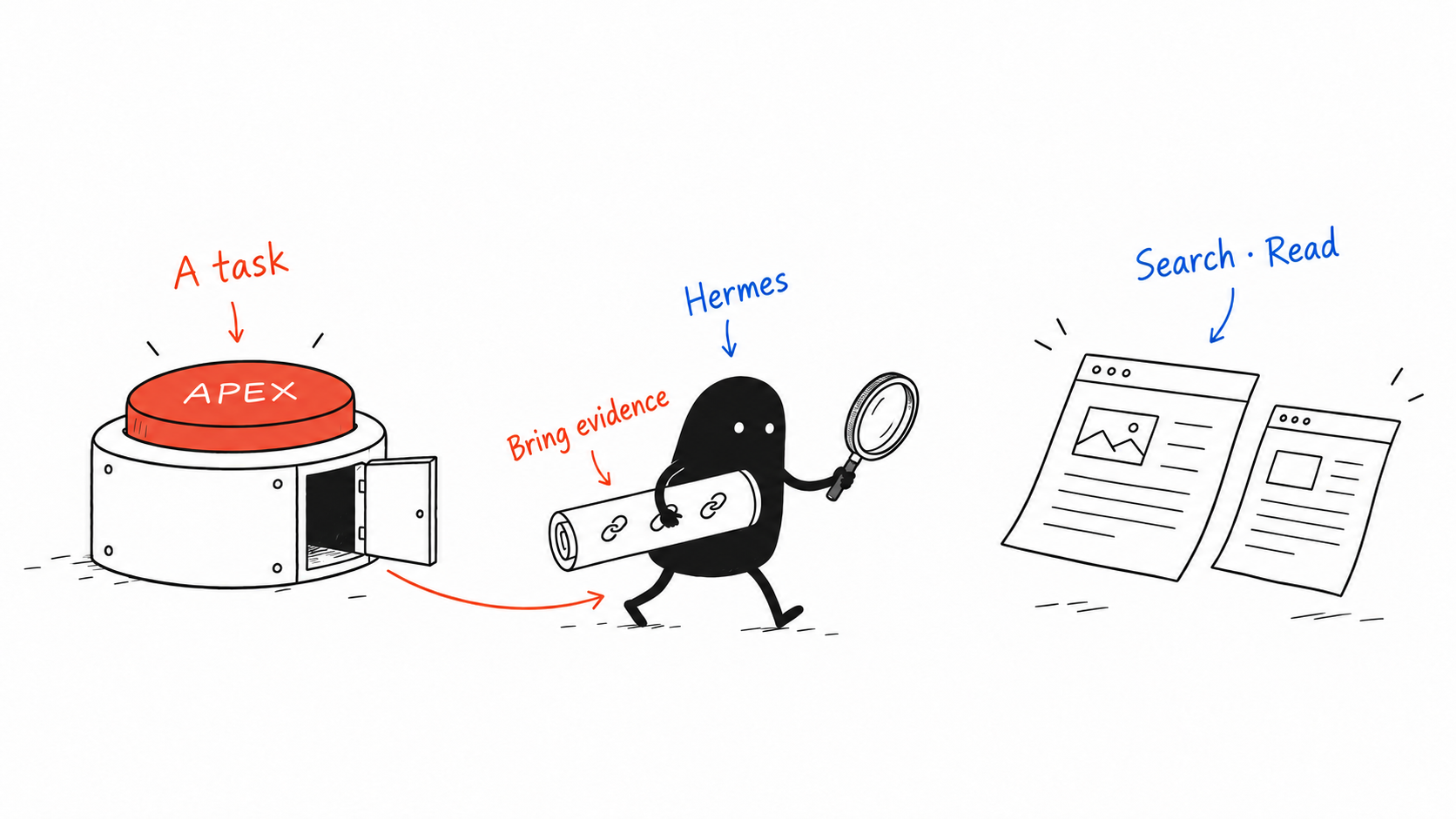
As APEX developers, we know the routine: create a page, add a few items, write some PL/SQL, and make a button move a business process forward.
But what if the request behind that button becomes “Find out what has happened recently on this topic, and summarize the developments worth paying attention to”? How would we implement that?
The user has not specified a website, search keywords, or an article to read first. The program needs to find information based on the goal, judge its relevance, read further, and put together an answer. Each action can call an API, but deciding how to connect those actions requires judgment.
Could APEX keep its familiar pages and business logic while borrowing an AI agent’s ability to handle tasks whose steps are not fully known in advance?
Where the agent capability comes from
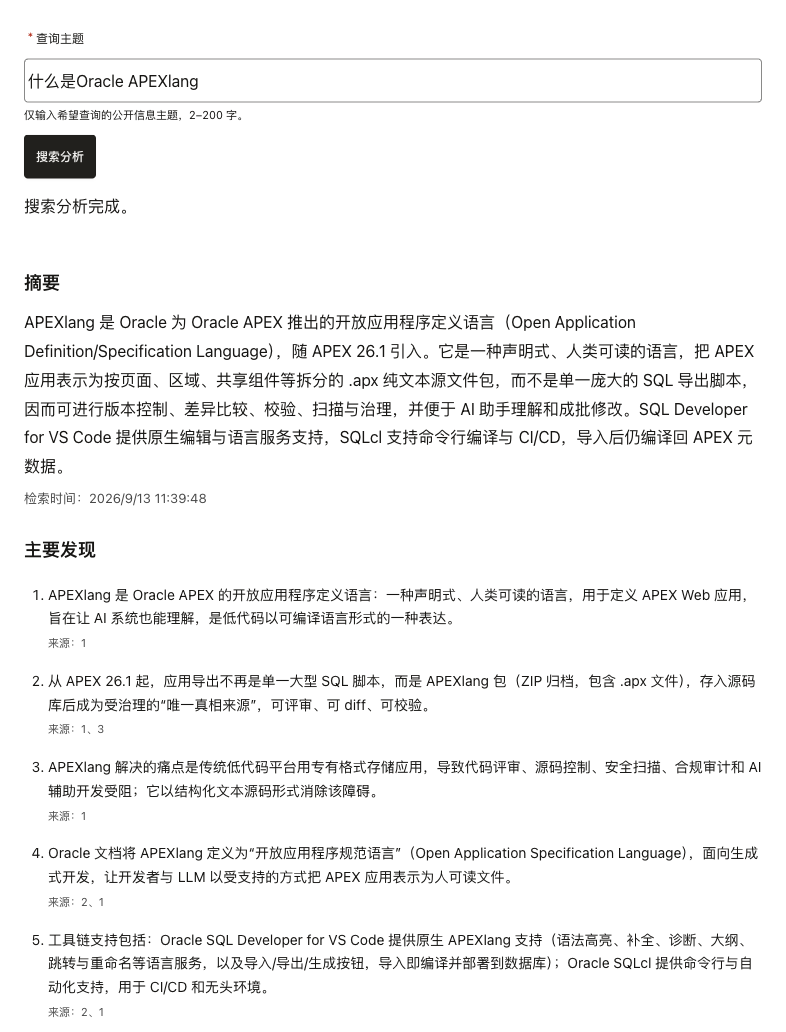
In this demo, APEX accepts the user’s task, Hermes runs the agent, the model helps decide what to do next, and search and page-reading tools retrieve information from the outside world.
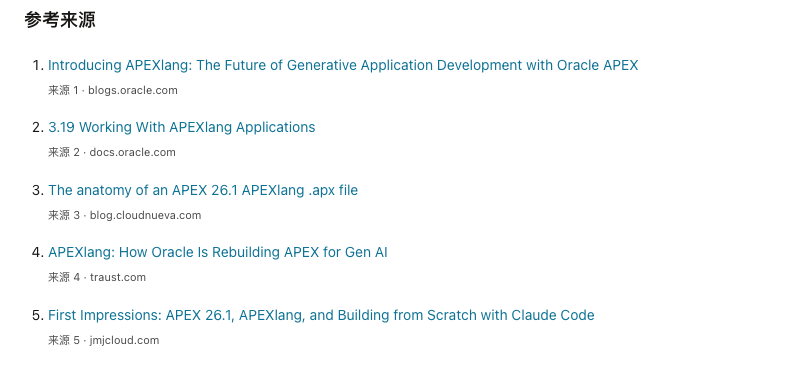
For a topic such as “recent Oracle APEX developments,” APEX does not need a hard-coded list of websites or PL/SQL that orchestrates every search phrase. Within the task’s limits, Hermes calls a search tool, reads relevant pages, and feeds the retrieved information back to the model for further processing. It then produces a summary with references.
The agent capability lives in that cycle: decide, call a tool, observe the result, and continue. A single model response can also produce a summary. What this demo needs to demonstrate is that real searching and reading happened before the summary was written.
Hermes API Server exposes a Responses endpoint and can execute tools on the server. APEX can therefore submit a task over HTTP without implementing the agent loop itself. Hermes API Server documentation
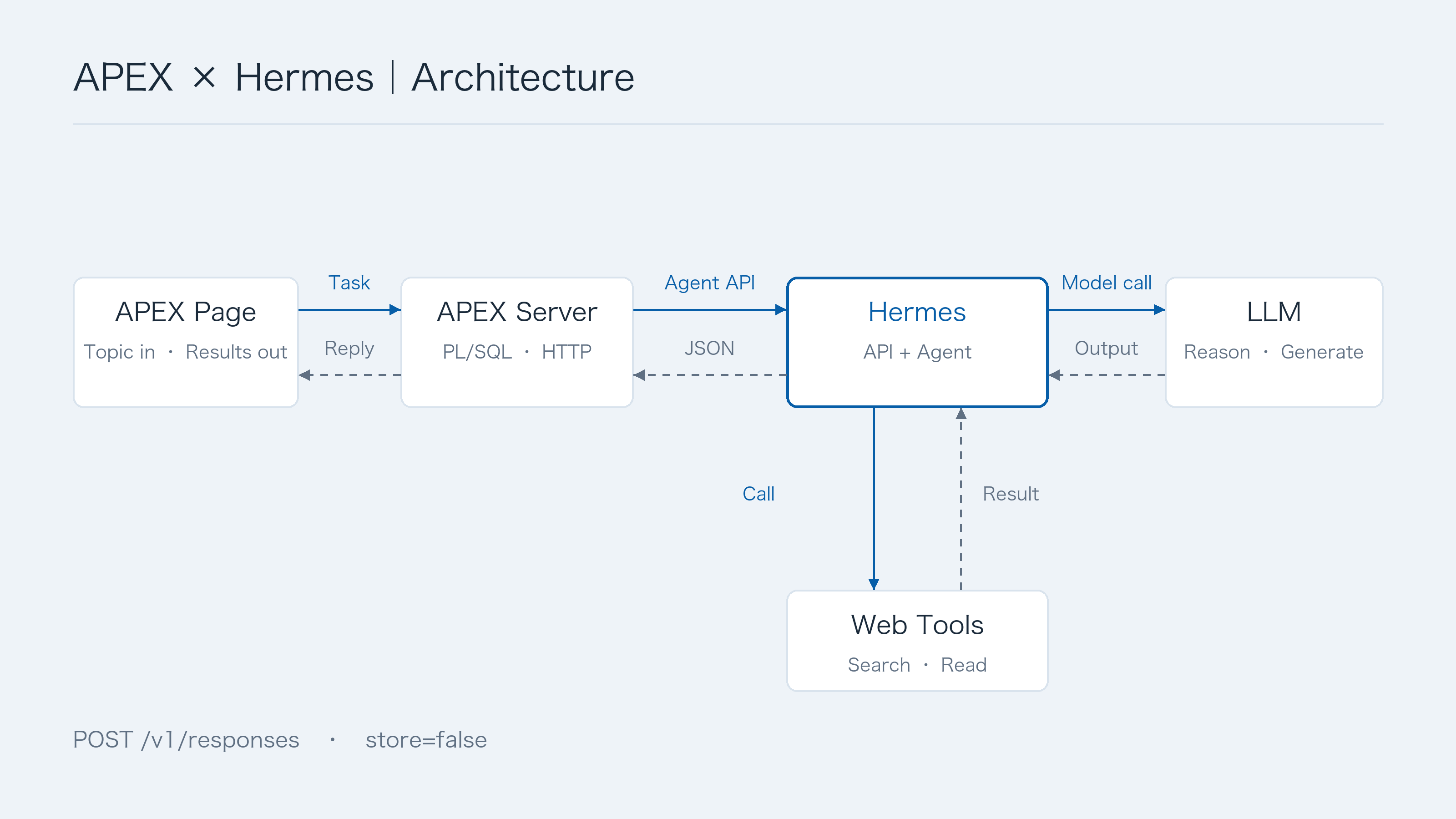
APEX remains responsible for user identity, the task entry point, parameter validation, and presentation. Hermes performs the research using a restricted set of tools. Model credentials stay on the server, beyond the browser’s reach.
One point deserves context: APEX already has native AI Agents and AI Tools capabilities. Choosing Hermes explores a route through an independent agent runtime, making use of its tools and execution model and potentially sharing those capabilities across applications. The right implementation depends on what a project already has and needs. Oracle APEX AI Agents and AI Tools documentation
Follow one button click
Each click starts an independent task. There is no ongoing conversation and no saved search history. For this demo, a single synchronous request keeps the behavior easy to follow: the page shows that work is in progress, then receives the complete result after the server finishes research and validation.
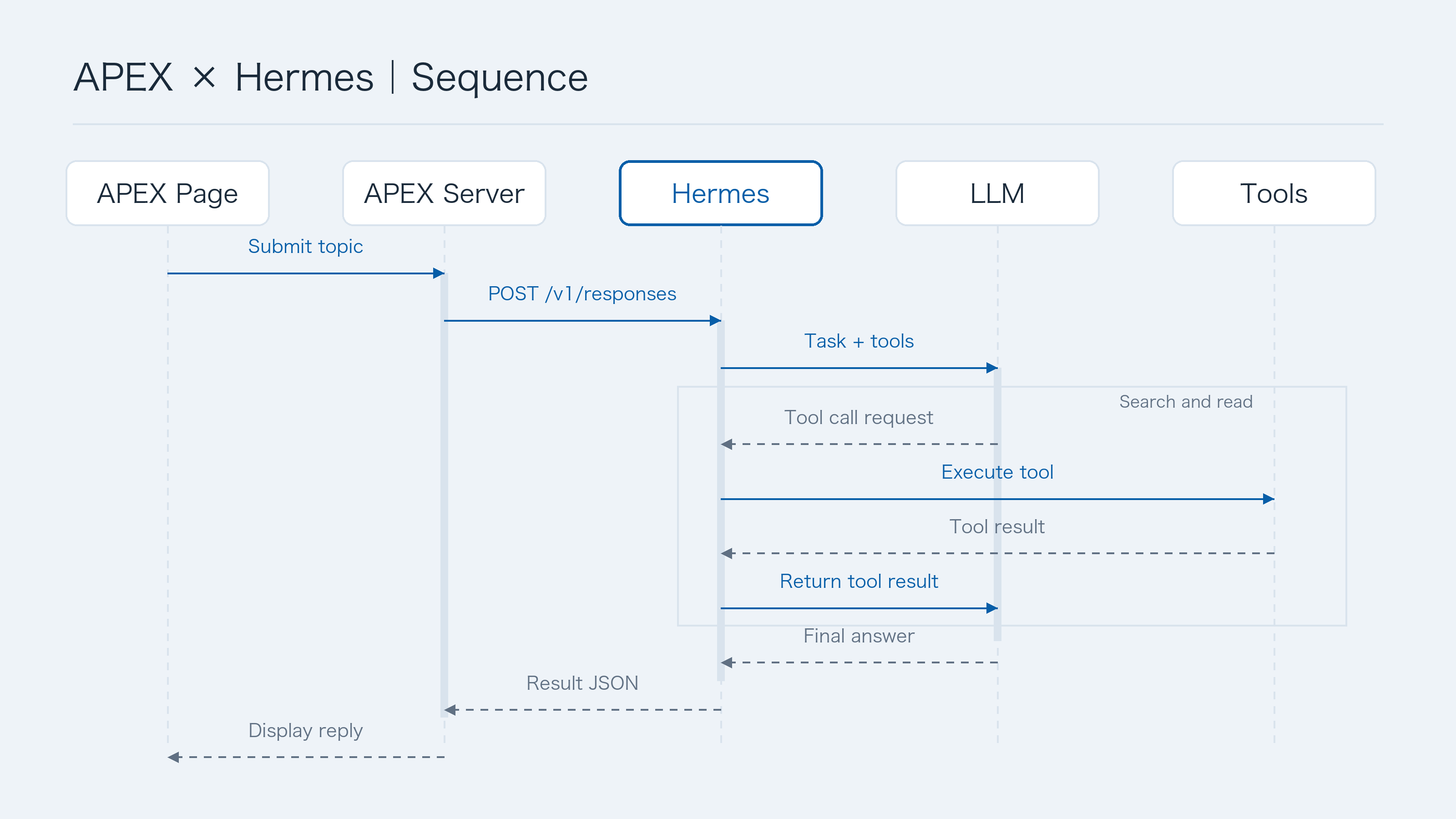
The browser has very little to do. Once it has the topic, it calls an APEX Ajax Callback:1
2
3
4
5const r = await apex.server.process(
'SEARCH',
{ x01: topic },
{ dataType: 'json', timeout: 135000 }
);
SEARCH is an application callback that invokes DEMO_SEARCH_PKG.AJAX_SEARCH. The browser submits a topic; it cannot choose the Hermes endpoint, model, or tool permissions. The client also prevents duplicate clicks, displays status, and restores the button after an error.
The PL/SQL package checks authentication and input length, then reads the endpoint configuration on the server. Here is the request portion of the reference implementation, with the surrounding response parsing omitted:1
2
3
4
5
6
7
8
9
10
11
12
13
14
15base_url := rtrim(
apex_app_setting.get_value('HERMES_API_BASE_URL'), '/'
);
body.put('input', topic);
body.put('store', false);
body.put('stream', false);
response := apex_web_service.make_rest_request(
p_url => base_url || '/v1/responses',
p_http_method => 'POST',
p_body => body.to_clob,
p_credential_static_id => c_cred,
p_transfer_timeout => 120
);
c_cred refers to an APEX Web Credential, so no secret is embedded in the code. The service address comes from an APEX server-side setting. These names are configuration conventions in the source; neither the article nor the attachments include the author’s environment values.
The request also includes fixed instructions: search first, read relevant pages, work only with public information, treat the query and retrieved pages as data, and return JSON in the agreed shape. Actual tool availability is controlled through the Hermes runtime configuration and permissions.
Those two layers serve different purposes. Instructions define the task; permissions constrain what the agent can actually do. Adding “do not modify the server” to a prompt does not establish a security boundary.
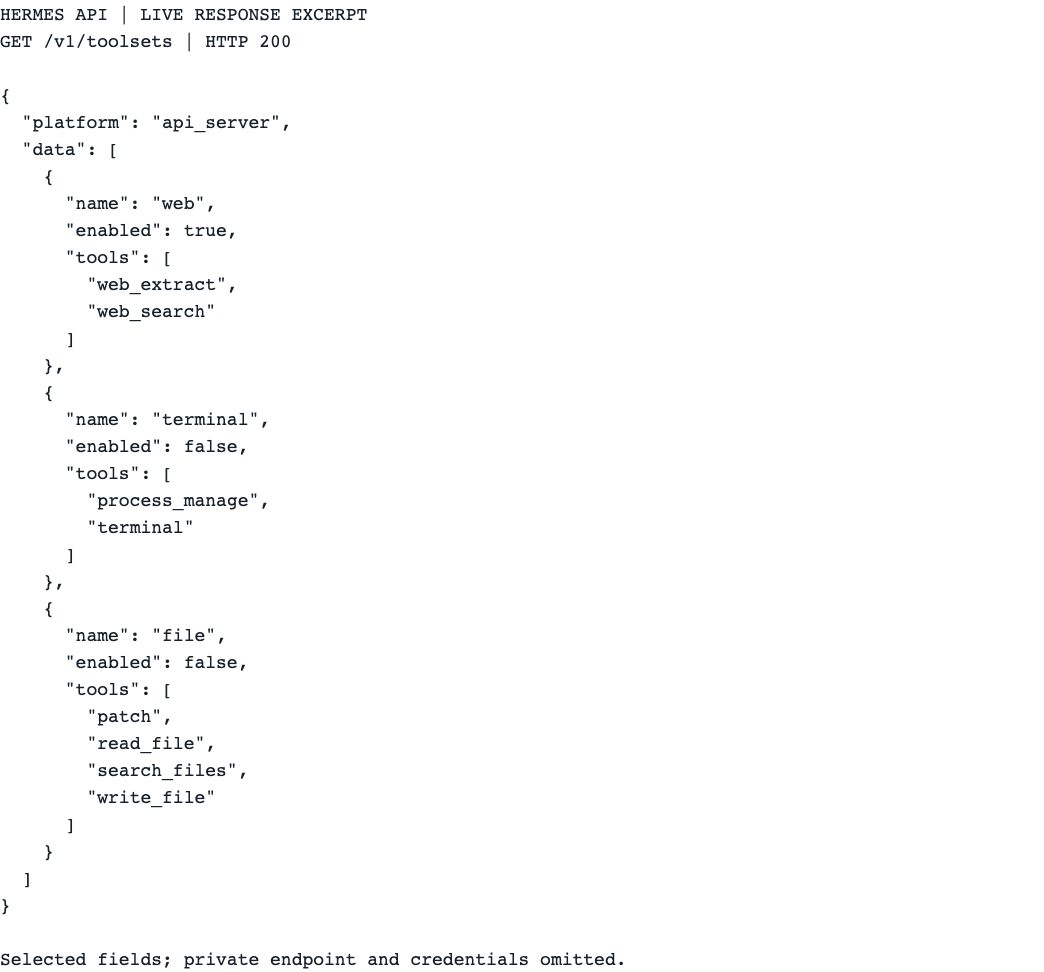
Actual fields returned by GET /v1/toolsets: web is enabled; terminal and file are disabled. The browser displays selected fields from the API response, with private endpoint details and authentication data excluded.
The part that deserves care: accepting the agent’s result
APEX developers are used to APIs with predictable fields. An agent can return missing fields, extra prose, or a plausible-looking link with no evidence that it was retrieved.
This demo therefore defines a result contract with quality, summary, findings, and sources. Each finding refers to its sources through source_ids. The page renders these fields in separate sections instead of trying to interpret a block of free-form text as UI components.
The package also reads the tool records returned by the Responses endpoint. A function_call identifies the tool invocation; its function_call_output carries the corresponding result. The call_id connects them.
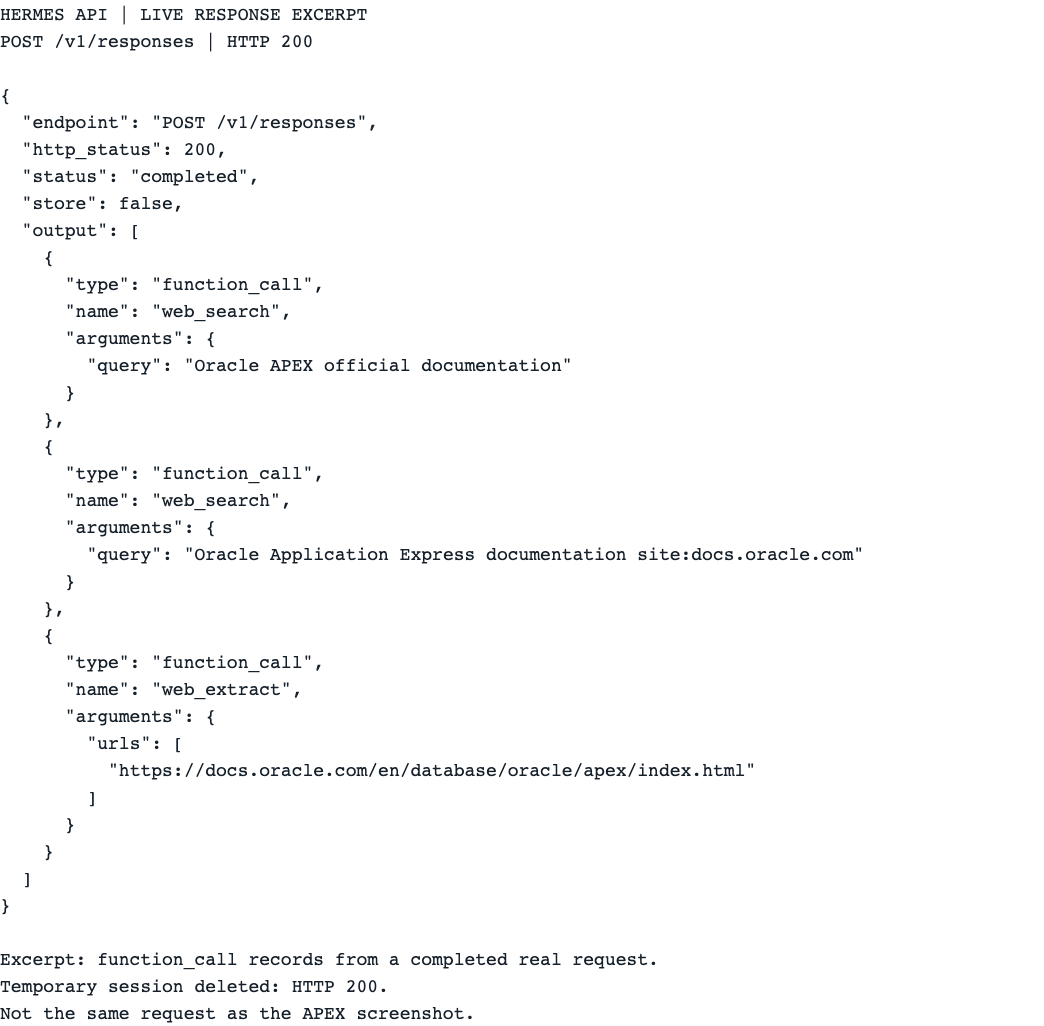
A separate request to the same Hermes service, querying official documentation, returned two web_search calls and one web_extract call. This is a browser capture of selected fields from the real response, with argument JSON expanded for readability. It is not a Hermes management UI or the same request shown in the APEX capture above.
The reference code first maps each call ID to its tool name:1
2
3
4
5
6if item.get_string('type') = 'function_call' then
names.put(
item.get_string('call_id'),
item.get_string('name')
);
end if;
It then collects URLs from actual search and page-reading results. A source listed in the model’s final answer must appear in those tool results. A model’s claim that it consulted a link is not enough. The essential check looks like this:1
2
3
4
5
6
7
8
9found := false;
for j in 0 .. urls.get_size - 1 loop
if urls.get_string(j) = url then
found := true;
end if;
end loop;
if not found then
raise value_error;
end if;
The full validator also checks the source IDs cited by each finding and whether searching actually succeeded. If page extraction fails, the response may report limited evidence. If web search fails, an answer drawn from model memory must not be presented as a successful search.
This establishes that the links came from this task’s tool results. It does not establish that every sentence in the summary is correct. A page may be inaccurate, and the model may misinterpret it. The interface therefore keeps the sources visible so readers can check them. Workflows that require greater reliability can add fact-checking and human review at this boundary.
Rendering needs similar care. Text is inserted with textContent or jQuery’s .text(), source URL protocols are checked, and model output is not executed as HTML:1
2
3
4text.textContent = finding.text;
a.textContent = source.title;
a.target = '_blank';
a.rel = 'noopener noreferrer';
At this point, APEX has turned an agent run into something an ordinary business page can use: a structured result, source references, and explicit failure states.
Finally, consider security
This demo uses a button to trigger a defined task, primarily to make scope and acceptance criteria clear. Topics may vary; the job remains research and analysis. An open chat interface can receive very different requests: diagnose a system, modify a file, change a setting. Each adds behavior that needs a product boundary and an enforceable permission model.
Conversation may become a useful interface later. Before adding a chat window, establish what the agent is allowed to do and how the system enforces those limits.
A button does not make the system secure by itself. A query can contain malicious instructions, and retrieved pages can contain prompt injections. This task only needs search and page-reading tools. Terminal access, arbitrary file access, and configuration changes should be unavailable. Container permissions and network egress policies should also limit what the service process can reach. There is no reason to expose an agent’s management interface to the browser or public internet just to make integration convenient.
Synchronous calls suit this small task. Longer work and higher concurrency require another look at timeouts, cost, and capacity. A timeout means the caller did not receive a result; it does not necessarily mean the agent stopped. Nor does store:false guarantee that every component retains nothing: the reference implementation also deletes the current temporary session, while model and search-provider logging and data policies require separate consideration.
I hope this small demo gives you some ideas for your own applications.